YOUR RESEARCH WORKSPACE

Research figures.
Made with R.

From spreadsheet to saved figure.
With tools to review, edit and export.

Register, then request workspace access.

Explore a relationshipMade with R
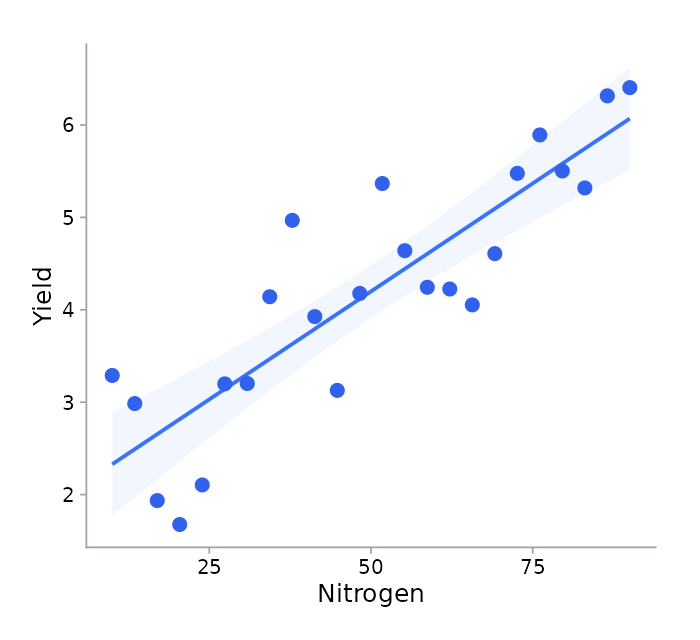
R scatterplot of synthetic nitrogen and yield observations, with a fitted line and uncertainty band.
Actual R figure, arranged for illustration. Synthetic data.

Your data is the starting point.
The figure is yours to shape.

PlotX brings the steps of creating a research figure into one workspace. Review your data, choose what to show and refine the result—with the R code within reach.

Explore the features
Start with a spreadsheet

Bring your data.
Keep the context.

Upload a CSV or select an Excel worksheet. Check the columns, review missing values and tell PlotX what your observations represent.

CSV & XLSX. Up to 25 MiB. One worksheet per dataset.

Getting started
A small place to start.Synthetic example dataset
Illustrative data preview with six synthetic observations
SampleGroupMeasurement
C01Control10
C02Control12
C03Control14
T01Treatment12
T02Treatment14
T03Treatment16

Illustrative preview · synthetic data
Made with R

A figure you can
keep working on.

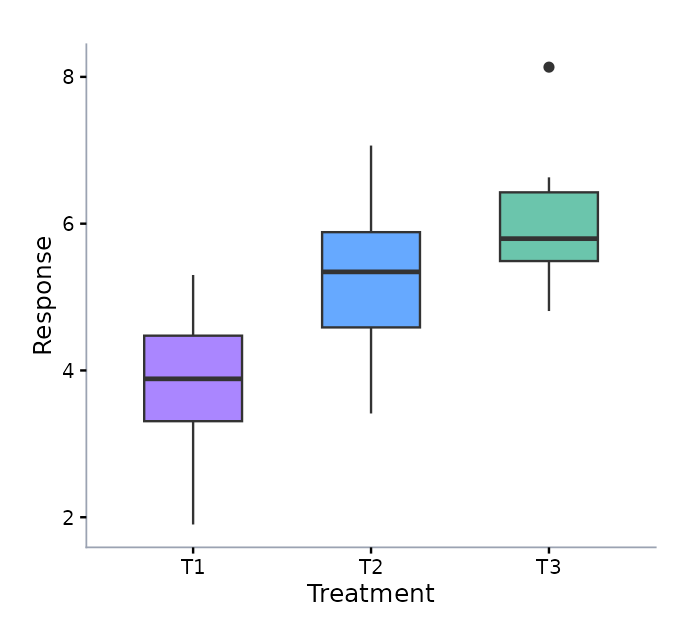
Adjust the configuration in the figure editor. Customize the R code when you need to go further.

Boxplot generated in R using synthetic data for three example groups.
Actual R output · synthetic data
Images & reports

Ready for your
next document.

Export selected figures as images or a PDF report. Add your own captions, and include matching R source and settings when needed.

PDFReportsSVGVector figuresPNGRaster figures
Explore export options

A clear next step.
All the way through.

From your first upload to the figure you save.
Explore the six steps of a PlotX project.

  1. 1Upload & setup

    Import a CSV or select one worksheet from an Excel workbook.

  2. 2Project details

    Add a project name, research question and experimental design context.

  3. 3Quick analysis

    Review column types and missing values. Confirm what each observation and variable represents.

  4. 4Select parameters

    Choose the numeric measurements you want to visualize.

  5. 5Choose plot types

    Decide how to present each selected measurement.

  6. 6Generate & refine

    Generate figures in R, edit the results and export your selected outputs.

The complete workflow

A pattern.
A distribution.
A place to begin.

See real R figures made from synthetic data, with explanations of the questions each chart can help you explore.

Explore the examples
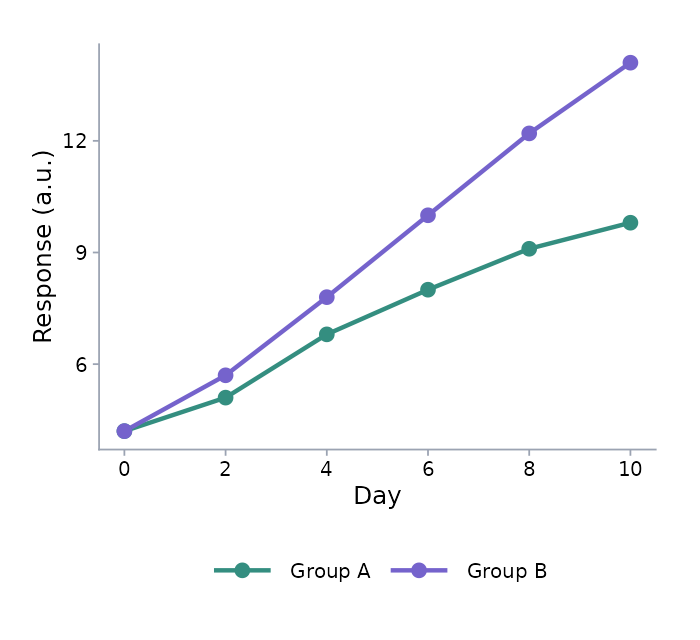
R line chart showing synthetic responses for two example groups across six time points.
Synthetic data. Lines connect example observations over time; they do not establish statistical significance.

A few things
you might be wondering.

What is PlotX?

PlotX is a research workspace for turning CSV and Excel data into figures and reports. Review your data, choose what to plot, edit figure settings and work with the underlying R code.

Which files can I upload?

Start with a CSV or XLSX file up to 25 MiB. For an Excel workbook, select one worksheet per dataset. Review the imported columns and missing values before generating figures.

Can I change the generated figures?

Yes. Use the figure editor to adjust the configuration and regenerate a figure. You can also customize the underlying R code. Figures are saved with your project.

What can I export?

Export selected figures as images in a ZIP bundle or as a PDF report. You can add your own captions and choose to include matching R source, configuration and runtime information.

Is account registration open?

Create an account, verify your email and request workspace access. Activation follows manual payment confirmation and approval.

Researchers remain responsible for experimental design, appropriate analysis and interpretation. Statistical testing is a separate action under Analysis.

Start with your data.

Create an account and request workspace access.

Get StartedQuestions about access? Contact PlotX